

We are excited to announce that version 2.8 of IncidentCheck has been released to production! This latest version contains many enhancements and new features based on, as always, user feedback and comments, plus our continuing vision that IncidentCheck be the leading incident reporting and management software there is.
Release 2.8 features:
- Statistics Overhaul
- Reassigning Groups for Admins
- Hidden and GeoCoded Groups
- Location moved to Groups
- Void Reports
- Injury Trend Graphs
Details:
Statistics Overhaul
Over time the statistics area has grown to have many different graphs, sometimes very similar in nature. We have overhauled this to make the interface much more consistent and at the same time providing more detailed time periods, right down to a daily range.
All of your graphs are still there, but they might be under slightly new headings, so take a look around. if you need help finding one of your favorites, never hesitate to call/email.
Reassigning Groups for Admins
As report groups are entered, spelling mistakes inevitably crop up. Previously you would need to find all of the reports with the misspelled group and then change them, then remove the group from the available choices. We have consolidated this into 1 action – in the Admin Settings, Report Groups area, when you delete a group, you are given the option of reassigning instead of just deleting (removing) it from the reports it appears on. In the following case, I want to ensure that “3CIS” (with capitals) is used instead of “3cis”: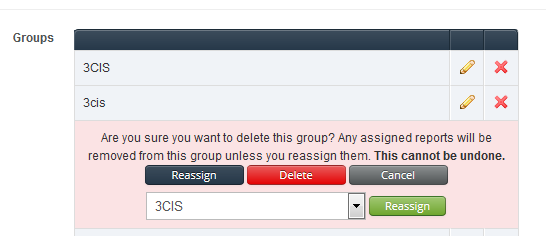
Hidden Groups and GeoCoded Groups
Also new in the group area are Hidden Groups. These groups are allowed to be entered and seen by administrators only. Some care is needed, however, when generating PDF reports, as if you generate it with the new option of adding hidden fields, that will be put in the PDF and therefore might be seen by others.
GeoCoded Groups allow you to specify a lat and long for each group, if you would like to add the report to a map.
Location moved to Groups
Closely related to geocoded groups is the move of Office Location, previously its own stand alone field to just be another group. This greatly simplifies things while still allowing you to use it in the same manner as before. When we looked at Location and how it was being used, we eventually realized that it should have been in the Group section all along, so this now fixes that.
Void Reports
Many industries have the notion of a VOID report, which is a report the want to track, but which is pretty much invisible when it comes time to tally stats. You can now mark a report as VOID and keep it in the system without fear that it will show up on TRIF or in quarterly stats.
Injury Trend Graphs
Following up on the detailed injury fields that we added a while back, we now have new graphs to show injury statistics. This is under Statistics -> Graphs -> Injuries. We have started with a small set, but as you have ideas for new graphs, please let us know and we can add them.
We are very excited about these changes and they lay the groundwork for even more additions in the future. We have a long roadmap with our user suggestions and we continually strive to add features to bring more and more value to our customers.
Thanks – The IncidentCheck team